

微信支付外国人实用指南

Step1 Register WeChat
Step1 注册微信
Prepare 3 items to get started
内容准备3样东西,就能准备
List :
清单:
①Passport (valid)
①护照(在有效期内)
② Overseas mobile number (SMS available)
②海外手机号(可收短信)
③the latest version of WeChat
③最新版微信
Path :Me→services→wallet
路径:我→服务→钱包
Cannot see Wallet: Me → Settings → General → Functions → WeChat Pay → Enable
看不到“钱包”:我→设置→通用→功能→微信支付→启用
Frequently Asked Questions :
常见问题:
Can't receive the verification code?
收不到验证码?
Check if the country code is correct (+country code)
✅️检查国家区号是否正确(+国家代码)
Toggle Wi-Fi or mobile data and try again
✅️切换wi-fi/移动数据后重试
✅Wait 1-2 minutes to retrieve again
✅️稍等1-2分钟再次获取
Step 2-1 Real-name authentication
Step2-1实名认证入口
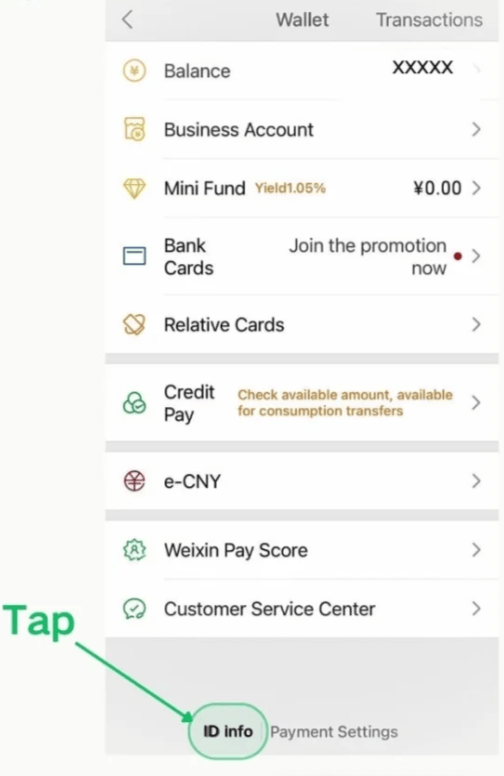
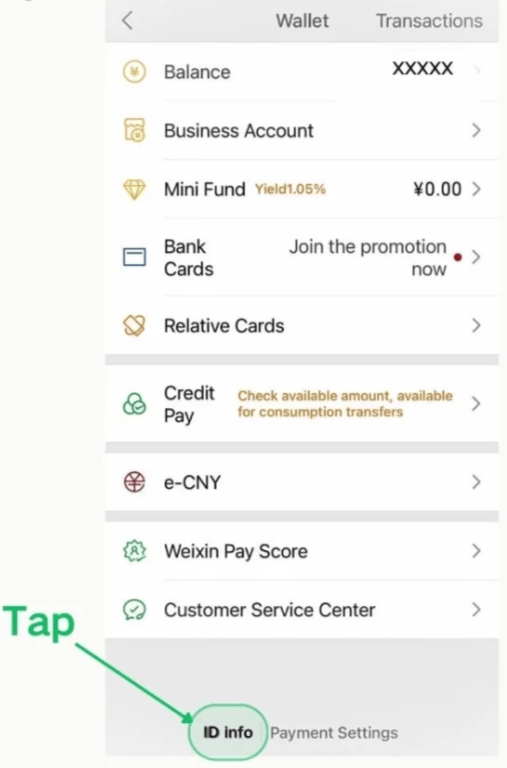
Path: Me→Services→Wallet→ID Info
路径:我→服务→钱包→实名认证
Frequently Asked Questions :
常见问题:
1. Can't find your wallet?
1. 找不到钱包?
Me→Settings→ General→Features/Tools→WeChat Pay→Enable
我→设置→通用→功能→微信支付→启用
2. Can't see ID Info?
2.看不到ID Info?
Update WeChat to the latest version first
先更新微信到最新版
3. Is the interface in Chinese?
3.界面是中文?
临时切英文:我→设置→通用→语言(英语)
Temporary English:Me→Settings→General→Language(English)
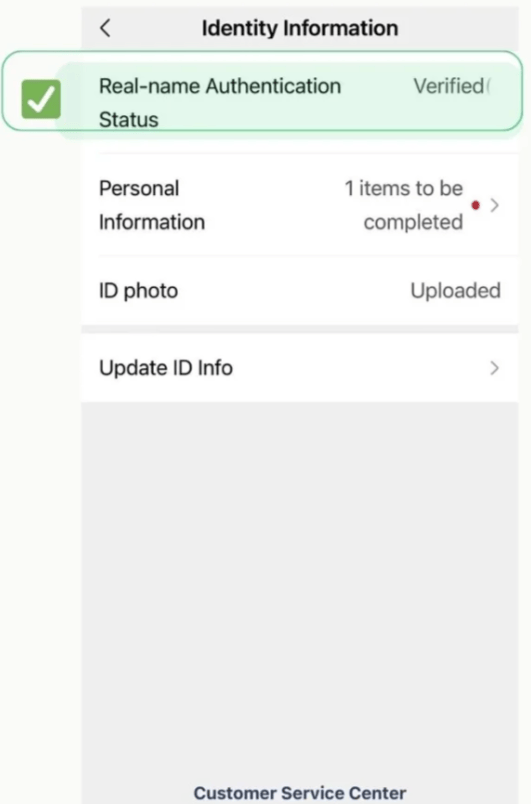
Step 2-2 Verify identity •Result
Step 2-2 实名认证 •结果
Tips:
提示:
The name must match the passport details exactly
姓名需与护照填写完全一致
Take ID and face in bright light
明亮环境拍证件+人脸
Upload and wait 1-2 minutes. If not approved, try again.
上传后等待1-2分钟,未通过可重试
Step 3-1 Add bank card • Entry
Step 3-1 绑卡入口
Path: Me→Services→Wallet→Bank→Cards
路径:我→服务→钱包→银行卡
Tips:
提示:
•Cannot find Wallet: Me→Settings→ General→Features/Tools→WeChat Pay→Enable
•找不到“钱包”?我→设置→通用→功能→微信支付→启用
• You need a valid international card (Visa/Mastercard/JCB, etc.). 3-D Secure or SMS verification is enabled
•需可用的国际卡(Visa/Mastercard/JCB等);卡号3-D secure/短信验证已开通
•Name must match passport details; billing address must be your country's address; exchange rate is based on the issuing bank
•姓名与护照一致;账单地址填本国地址;汇率以发卡行为准
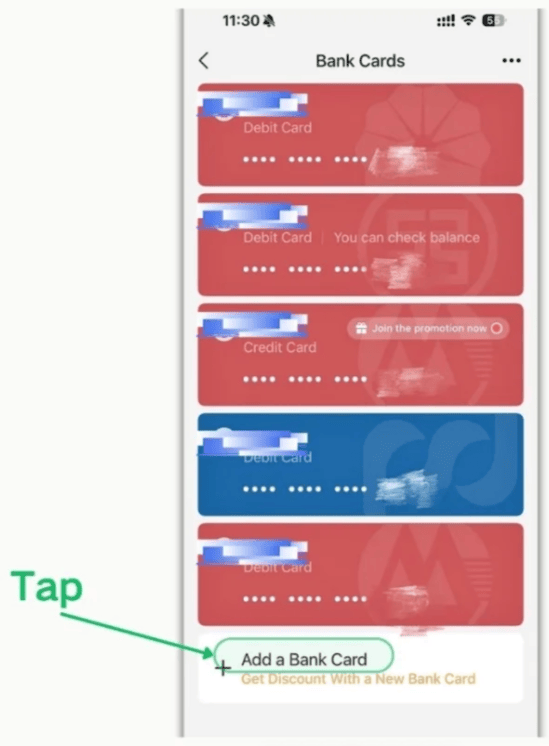
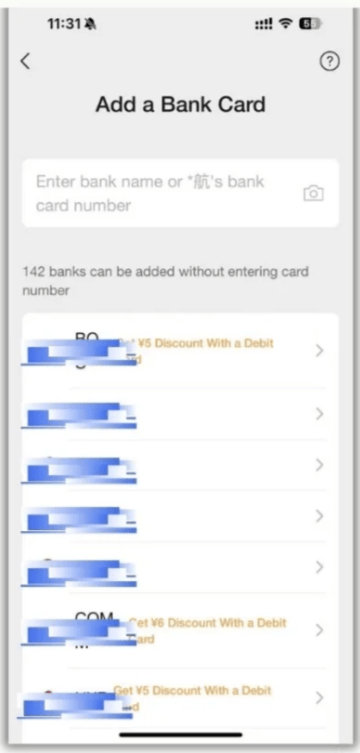
Step 3-2 Add a bank card•Select/Input
Step 3-2 添加银行卡•选择/输入
Operation Points
操作要点
1. Search the bank or scan the camera to identify the card number
1.搜索银行或点相机识别卡号
2. Enter the card number and information, then submit
2.输入卡号与信息,然后提交
3. The card appears in the list after successful payment
3.成功后出现在银行卡列表
Step 3 troubleshooting for adding cards
Step 3 绑卡常见问题·排查故障
Key Points :
要点:
①开启3-D secure/ 网购功能——3-D secure & e-commerce ON
②姓名=护照;账单地址=发卡行账单地址——Name=passport;Billing=Card billing address
③能接受短信的手机号(海外号可)——Mobile that can receive SMA (foreign OK)
④失败重试:更新微信微信/切换WiFi/蜂窝/换网后再试——Update WeChat, Switch network, retry
⑤仍不行:换卡或换银行卡(visa/Mastercard/JCB/discover/diners)——try another bank/card
Step 4 设置支付密码·小额验证
Step 4 Set payment password ·small verification
路径:钱包→支付设置→支付密码
Path: wallet→payment settings→payment password
1.设置6位支付密码→set a 6-digital payment password
2.确认卡信息/姓名与护照一致→name must match passport
3.可能会产生小额验证扣款(可退)→A small refundable verification charge may occur
4.绑定后可在payment settings 随时修改密码→You can change it anytime in payment settings
·Can’t find payment settings?It’s at the bottom of wallet.
·找不到payment settings?在wallet 页底部可见
·Failed multiple times: Update app/ Switch network/ retry later
·失败多次:更新WeChat/切换网络/稍后再试
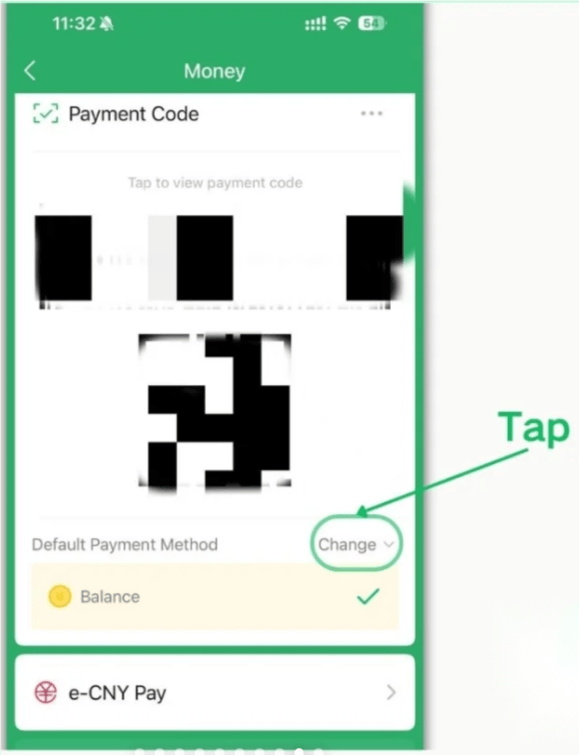
Step 5-1 show payment code ·merchant scans your code
Step 5-1 出示付款码·商家扫码
Path: me→services→money→pay/receive code
路径:我→服务→钱包→支付/付款码
1.线下最常用:把付款码给店员扫码/most common: show your code to the cashier
2.需输入6位支付密码(多数场景)/you’ll often enter a 6-digit password
3.失败时→换收银扫码器再试 if it fails: change scanner/angle, or use scan
Step 5-2 scan to pay ·you scan merchant QR
Step 5-2 扫一扫·你扫商家码
Path: chats→”+”→→scan
路径:微信→“+”→扫一扫
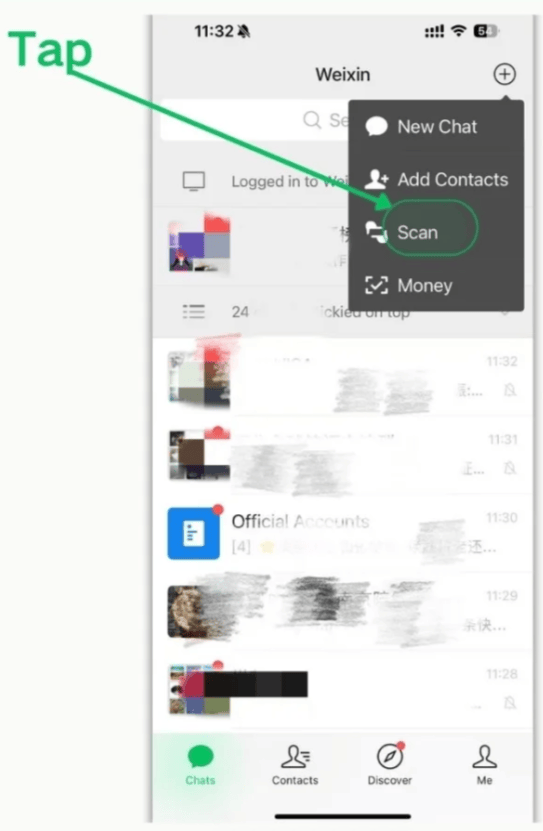
1. Ensure adequate lighting and avoid reflections; confirm after amount verification
1.光线要充足,避免反光;金额核对后再确认
2. Rejected: Switch network or try again, or switch to "Show payment code"
2.被拒:切换网络/重试,或改用“出示付款码”